Why Every Founder Eventually Needs This
Python holds the number one spot on the TIOBE index in 2026 with 18.96% of programming search share. Its dominance comes almost entirely from data work. The global marketing automation market alone reached $6.65 billion in 2024 and will hit $15.58 billion by 2030.
Behind every automation platform, every AI product, and every dashboard sits the same thing: a data pipeline. Data flows from source to storage to a place people can use it.
Most founders never learn what one is. They pay for tools that hide the pipeline until the tool breaks and they cannot fix it.
This post fixes the gap.
Chapter 1: What ETL Actually Means
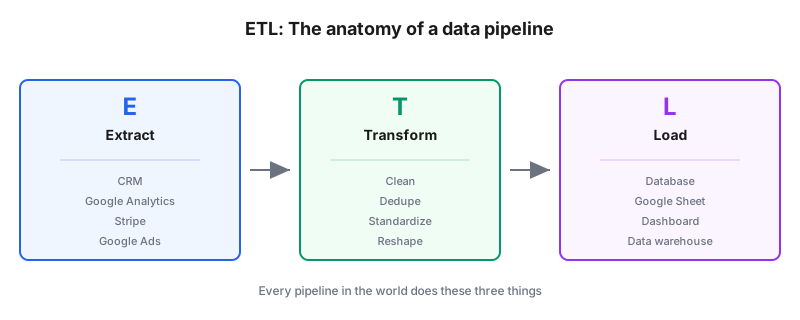
Three letters. Three steps.
E for Extract. Pull data from a source. An API, a database, a spreadsheet, an email.
T for Transform. Clean, standardize, deduplicate, or reshape the data so it makes sense.
L for Load. Write the transformed data into a destination where someone can use it.
Every data pipeline in the world does these three things. The names change, the tools change, the scale changes. The pattern stays.
A pipeline that emails you a daily sales summary and one that runs Netflix's recommendations use the same three-step logic.
Chapter 2: Why You Would Want One
Four common triggers push a founder from "I do it by hand" to "I need a pipeline."
Reports take too long. Weekly reporting eats a full workday, and there is no room to grow.
Numbers do not match. The Ads dashboard says one thing, the CRM says another. Nobody trusts the executive summary because the source of truth is unclear.
Two tools that should share data do not. The email platform does not talk to the CRM. Contacts get manually re-uploaded weekly.
A team is about to hire. Growth is coming. Manual data work will not scale to five people.
Any of these is the moment to build a pipeline.
IBM estimates bad data costs U.S. businesses $3.1 trillion annually. Gartner's benchmark pegs the cost per organization at $12.9 million per year. Most of that damage traces to missing or broken pipelines that let bad data flow into decisions.
Chapter 3: The Free Pipeline Stack
You do not need Snowflake, dbt, or Airflow for your first pipeline. You need three things you already have.
Google Sheets as the destination. Free. Familiar. Connects to almost every business tool.
Google Apps Script as the extract and transform engine. Free. Runs on Google's servers. No installation.
A scheduled trigger so the pipeline runs itself. Free and built into Apps Script.
Total cost: zero. Total time to build the first version: an afternoon.
Chapter 4: Design Before You Build
Before writing any code, answer four questions in a document.
What is the source? A Google Analytics property, a Stripe account, a HubSpot list, a webhook from a form. Name it specifically.
What is the destination? A Google Sheet, a database table, a Looker Studio dashboard. Name that too.
What transformations happen in between? Dedupe on email. Convert timezone. Filter to last 30 days. Every transformation gets one line.
How often does the pipeline run? Hourly, daily, weekly. Match the cadence to how fast the source data changes.
Answering these four in writing takes 15 minutes and saves hours of rebuild later.
Chapter 5: The Extract Step
For Google's own tools, Apps Script has native services. Analytics, Ads, Search Console, Gmail, Sheets, Calendar. Enable the service you need in the editor's Services panel.
For anything else, use UrlFetchApp to call a REST API.
function extractFromAPI() {
  const url = 'https://api.example.com/data';
  const options = {
    headers: { 'Authorization': 'Bearer YOUR_API_KEY' }
  };
  const response = UrlFetchApp.fetch(url, options);
  return JSON.parse(response.getContentText());
}
That single function fetches JSON from any authenticated API and returns it as a JavaScript object.
Store API keys in Script Properties, not in code. Click Project Settings, then Script Properties, then add your key with a name like API_KEY. Reference it in code as PropertiesService.getScriptProperties().getProperty('API_KEY').
Chapter 6: The Transform Step
Once you have raw data, clean it before writing to the destination.
function transform(rawData) {
  return rawData
    .filter(row => row.status === 'active')
    .map(row => ({
      email: row.email.toLowerCase().trim(),
      created: new Date(row.created_at),
      amount: parseFloat(row.amount) || 0
    }));
}
Three lines that filter out inactive rows, normalize emails, and coerce number types. Every pipeline needs a version of this.
For messy CRM data, the Pandas cleaning approach covered in a separate pillar guide applies here too, just written in JavaScript inside Apps Script.
Chapter 7: The Load Step
Write to your Sheet with setValues, not one cell at a time.
function loadToSheet(cleanData) {
  const sheet = SpreadsheetApp.openById('SHEET_ID').getSheetByName('Data');
  const rows = cleanData.map(item => [item.email, item.created, item.amount]);
  sheet.getRange(sheet.getLastRow() + 1, 1, rows.length, 3).setValues(rows);
}
setValues writes the whole array in a single operation. Doing it one row at a time is 100 times slower and blows through execution time limits.
Chapter 8: Putting It All Together
The full pipeline as one function:
function runPipeline() {
  const raw = extractFromAPI();
  const clean = transform(raw);
  loadToSheet(clean);

  Logger.log(`Pipeline complete. Loaded ${clean.length} rows.`);
}
Three function calls. Set a daily trigger on runPipeline. The pipeline now runs itself.
This is the entire pattern professional data engineers use, just at a smaller scale and running on free infrastructure.
Chapter 9: Adding Data Quality Checks
A pipeline that quietly loads bad data is worse than no pipeline.
function runPipeline() {
  const raw = extractFromAPI();
  const clean = transform(raw);

  if (clean.length === 0) {
    GmailApp.sendEmail('you@example.com', 'Pipeline warning', 'Extracted zero rows. Investigate.');
    return;
  }

  const invalidEmails = clean.filter(r => !r.email.includes('@')).length;
  if (invalidEmails > 0) {
    Logger.log(`Warning: ${invalidEmails} rows had invalid emails`);
  }

  loadToSheet(clean);
}
Two checks. Zero rows means something broke upstream. Invalid emails means the source got dirtier. Both get flagged before the data lands.
Coffee.ai research shows B2B contact databases lose 2.1% of their accuracy every month, which compounds to 22.5% annually. SaaS company databases decay even faster at 40-50% per year. A pipeline without quality checks compounds those problems instead of catching them.
Chapter 10: When to Graduate to Real Data Tools
Apps Script hits real limits.
6-minute execution cap on free accounts. 30 minutes on Workspace. Batch and chunk to work around this. If you can't chunk it, graduate.
Sheets slow past 100,000 rows. Formulas start recalculating for minutes. Queries drop rows. Time to move to BigQuery, Postgres, or another real database.
Multiple sources need real orchestration. When your pipeline pulls from six APIs and one depends on another, Apps Script triggers get fragile. Airflow, Prefect, or n8n handle this properly.
For most small businesses, Apps Script covers years of growth before any of these limits matter.
Chapter 11: The Vocabulary You Now Know
Founder conversations with data engineers get easier when you know the words.
| Term | What it means |
|---|---|
| ETL | Extract, transform, load. The classic pattern. |
| ELT | Extract, load, transform. Modern variant where you dump raw data first, then transform in the destination. |
| Data warehouse | A database optimized for analytics. BigQuery, Snowflake, Redshift. |
| Data lake | A store for raw unstructured data. Usually cloud storage. |
| Pipeline orchestration | Software that runs pipelines on schedule and handles failures. Airflow, Prefect. |
| Data quality checks | Automated validation that catches bad data before it flows through. |
| Schema | The structure of your data. Column names, types, constraints. |
Learn this vocabulary. Vendors and hires will take you more seriously.
Chapter 12: The One Rule That Prevents Disasters
Version everything. Every pipeline. Every transformation. Every schema.
Apps Script has version history built into every file. Use it. Add a comment when you save a meaningful change.
For code kept outside Apps Script, use Git. Even a solo founder benefits from Git. When a pipeline breaks at 2 AM, being able to see what changed in the last commit is the difference between a 10-minute fix and a 3-hour debugging session.
Commentary Section
Reach out to three data engineers and three technical founders for their favorite "first pipeline" story. What did they build? What broke? What would they do differently?
Their stories add color and credibility. The variety of setups shows readers there is no single right answer. Every quoted contributor becomes an outreach target when you promote the piece.
Wrapping Up
A data pipeline is three steps. Extract, transform, load. The free stack of Google Sheets and Apps Script handles the first pipeline for most small businesses without a paid tool. Design in writing before building. Add quality checks so bad data does not silently ruin your reporting. Graduate to real orchestration when you outgrow the limits.
Related tutorials worth reading next: the Cleaning Messy CRM Data with Python Pandas guide for a bigger transformation example, the weekly client reporting dashboard guide for turning pipeline output into a report, and the beginner's guide to Apps Script triggers for scheduling this pipeline properly.
Sources: