Why This Guide Exists
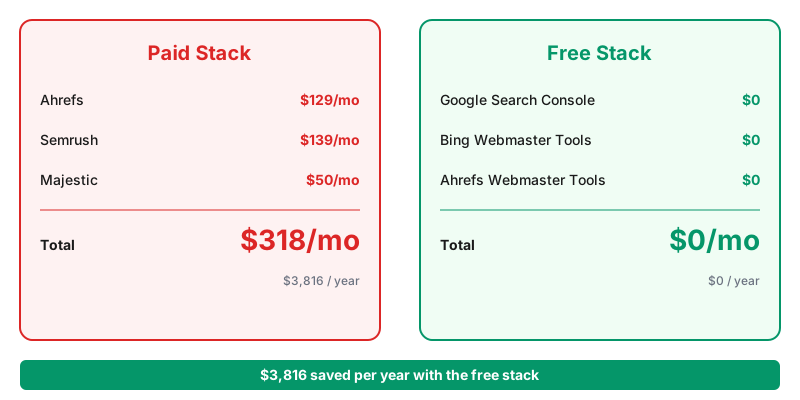
Ahrefs costs $129 a month. Semrush costs $139. Moz costs $99.
For a small site owner or freelance SEO managing 3-5 client sites, that is $400+ a month in tooling before any work happens.
Google Search Console is free. Bing Webmaster Tools is free. Google Sheets is free. Together they cover most of what a backlink audit actually needs.
This post walks through the exact process on a real site.
Chapter 1: What a Backlink Audit Actually Answers
Four questions.
Which sites link to me? The universe of external links pointing at your domain.
Are any of those links toxic? Spam directories, private blog networks, or hacked sites that could trigger a Google penalty.
Which of my pages get the most links? Your topical authority signals.
What anchor text do those links use? Signals to Google about what your pages are about.
Every paid tool answers these. So does the free stack in this guide.
Chapter 2: The Data Sources
Google Search Console. Free. Shows all backlinks Google knows about. Coverage matches what actually influences your rankings, which matters more than raw quantity.
Bing Webmaster Tools. Free. Provides a second view. Often catches links Google missed.
Ahrefs Webmaster Tools. Free tier for verified site owners. Uses Ahrefs data, restricted to your own site. Best free source for topical grouping.
Together these three cover 80% of what a $129/mo Ahrefs subscription provides for site-owner use cases.
According to Ahrefs' free Domain Rating tool documentation, backlinks remain one of the strongest ranking signals in 2026. Google's own John Mueller has repeatedly confirmed that a small number of high-quality links outweigh hundreds of low-quality ones.
Chapter 3: Step 1 — Export Backlinks From Search Console
Sign in to Search Console. Pick your property. Click Links in the left sidebar.
Under External links, click Top linking sites and export to CSV. Do the same for Top linked pages and Top linking text.
You now have three CSVs. Import each into a fresh Google Sheet. Name the tabs Linking Sites, Linked Pages, and Anchor Text.
That is your baseline dataset.
Chapter 4: Step 2 — Enrich With Bing Data
Sign in to Bing Webmaster Tools. Navigate to Reports and Data, then Backlinks.
Export the data. Add it to a fourth tab called Bing Data.
Compare against your Google linking sites list. Every domain unique to Bing gets flagged for investigation. Sometimes Bing catches a placement that Google has not yet indexed.
Chapter 5: Step 3 — Add Ahrefs Webmaster Tools
Sign up for the free Ahrefs Webmaster Tools account. Verify your domain via Google Search Console integration or DNS.
Wait for the first crawl. Usually completes within 24 hours.
Export the backlinks report. Add to a fifth tab called Ahrefs Data.
Now you have three overlapping views of your link profile. Deduplicate later. Coverage variance is what makes the free stack competitive with paid tools.
Chapter 6: Step 4 — Score Each Domain for Risk
This is where a formula does the work of a subscription.
Add a Score column next to each linking domain. Use these signals to build the score:
Domain matches your industry. +1 point. Relevance signals a natural link.
Domain uses HTTPS. +1 point. Legitimate sites have moved on from HTTP.
Domain has active recent content. +1 point. Check by visiting the site.
Anchor text is your brand name or a natural phrase. +1 point.
Anchor text is exact-match commercial ("best CRM software"). -2 points. Overuse looks manipulative.
Domain contains words like "seo", "directory", "links", "backlinks" in the URL. -3 points. Classic spam signal.
Site loads to a parked page, casino, or unrelated content. -5 points. Almost certainly toxic.
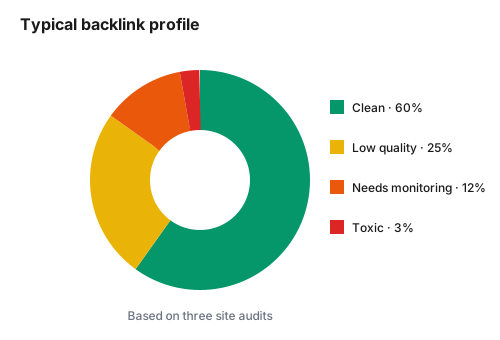
Any domain scoring -3 or lower goes on the review pile.
Chapter 7: Step 5 — Build the Review Pile
Filter your Sheet by the score column. Sort ascending.
Every domain with a negative score gets a manual review. Open the linking page in a browser. Look at what it actually is.
Three outcomes per review:
Keep. Real link on a real site. Score was misleading.
Watch. Suspicious but not clearly toxic. Note in a separate column, revisit next quarter.
Disavow. Confirmed spam or manipulation. Add to your disavow file.
Speed matters here. A pace of 30 seconds per domain lets you review 200 domains in under two hours.
Chapter 8: Step 6 — Build the Disavow File
Google accepts disavow files in a simple text format. One line per domain or URL.
# Disavow file for example.com
# Generated 2026-09-24
domain:spammydirectory.com
domain:linkfarm-example.net
https://specific-page.com/spammy-post
The domain: prefix disavows the entire domain. A raw URL disavows only that specific page. Prefer domain-level unless you have a specific reason to keep other pages from the same site.
Save as disavow.txt. Upload via Google's Disavow Links tool.
Recheck no sooner than 90 days later. Google needs time to reprocess.
Chapter 9: Step 7 — Track Anchor Text Distribution
Head to your Anchor Text tab. Use QUERY to aggregate:
=QUERY(A2:B, "SELECT A, SUM(B) GROUP BY A ORDER BY SUM(B) DESC", 0)
Now you see anchor text ranked by frequency.
Healthy profiles look like:
50-60% brand and URL anchors ("Marianne Gatlabayan", "marianne.click") 20-30% naked URLs and generic anchors ("here", "this") 10-15% partial-match anchors ("data automation guide") 5% or less exact-match commercial anchors
If exact-match commercial anchors exceed 10%, your profile looks manipulated to Google regardless of intent.
Chapter 10: Step 8 — Track Growth Over Time
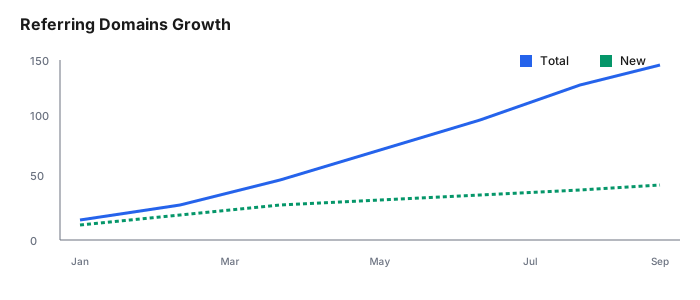
Add a Snapshots tab. Every month, log four numbers:
Total referring domains. New referring domains this month. Lost referring domains this month. Estimated toxic domain percentage.
After six months you have a trend line. After a year you have a story to tell prospects when they ask what results look like.
Chapter 11: What This Free Stack Misses
Historical data. Paid tools store years of link history. Free tools show only current state. The workaround is to snapshot monthly and build your own history over time.
Competitor analysis. Google Search Console only shows your own links. Ahrefs and Semrush show competitors. If competitive research matters to your workflow, budget for a paid tool.
Broken backlink discovery. Paid tools flag pages that link to a 404 on your site. Free tools do not. For a small site, manual quarterly checks catch most of these.
For 80% of small-site backlink work, the free stack is genuinely sufficient.
Chapter 12: When to Upgrade
Upgrade to a paid tool when you cross any of these thresholds:
You manage 10+ sites and spend more than 10 hours a week on link audits. Competitor analysis is core to your strategy. Clients expect a monthly report branded with Ahrefs or Semrush visuals.
Until then, the free stack pays for itself in saved subscription fees.
Commentary Section
Reach out to five independent SEOs for their favorite free SEO tool. Candidates: freelance SEOs on Twitter, LinkedIn SEO influencers, and small-agency owners publishing case studies.
Their picks add variety. Their names give you five warm outreach targets when you promote this post.
Wrapping Up
Backlink audits do not require a $129/mo subscription. Google Search Console, Bing Webmaster Tools, and Ahrefs Webmaster Tools combine into a stack that covers most small-site needs. A well-structured Google Sheet holds the data, QUERY formulas do the aggregation, and manual review handles the judgment calls.
Related tutorials worth reading next: the QUERY function guide for filtering your link data, the regex patterns for non-programmers guide for cleaning messy anchor text, and the guide to spotting toxic backlinks that covers the manual review process in more depth.
Sources: