Why Dirty CRM Data Is a $3.1 Trillion Problem
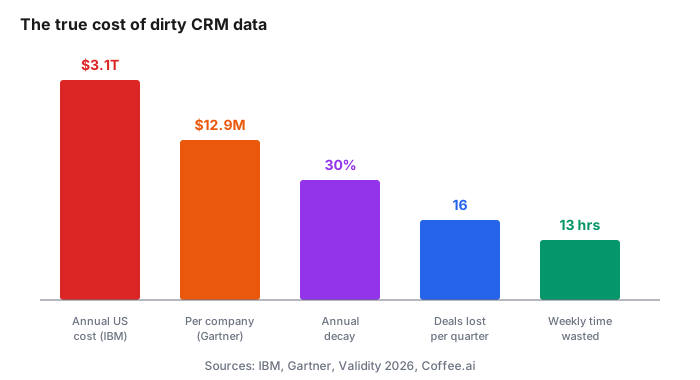
IBM estimates that bad data costs U.S. businesses $3.1 trillion a year. The Gartner benchmark most consultants cite pegs the cost per organization at $12.9 million annually.
At the tactical level, the damage looks smaller and hurts more. Companies lose an average of 16 sales deals per quarter due to bad data. Workers burn 13 hours a week hunting for basic CRM information. Contact data decays at 30% per year without maintenance.
Python Pandas is the free tool that fixes most of it. This guide walks through the exact steps on a messy sample CRM export.
Chapter 1: What You Need Before You Start
Python 3.10 or newer. Pandas installed via pip install pandas.
A CSV export from your CRM. Any CRM. HubSpot, Salesforce, Pipedrive, or a spreadsheet dumped as a CSV.
A code editor. VS Code works. So does a Jupyter notebook or Google Colab if you prefer running in the browser.
That is the entire stack.
Chapter 2: Loading Your Data
Start with two lines.
import pandas as pd
df = pd.read_csv('crm_export.csv')
print(df.head())
df.head() shows the first five rows. Confirm the columns you expect are there and the encoding is not garbled.
If you see garbled characters, add encoding='latin-1' or encoding='utf-8-sig' to the read_csv call.
Chapter 3: The Diagnostic Pass
Before cleaning anything, measure the damage.
print(f"Total rows: {len(df)}")
print(f"Duplicate rows: {df.duplicated().sum()}")
print(f"Missing values per column:\n{df.isnull().sum()}")
This tells you what percentage of your data is unusable. Most CRM exports come back with 20-30% duplicate rows and missing values in 40% of the "optional" fields.
According to CRM benchmarking data, when a CRM carries 20 to 30% duplicate accounts, every report overstates reality. B2B contact databases lose 2.1% of their accuracy every month, which compounds to 22.5% annually. SaaS companies experience 40-50% annual data decay.
Chapter 4: Removing Duplicates the Right Way
The naive approach:
df = df.drop_duplicates()
That only catches rows where every column matches. Real duplicates rarely look identical. "John Smith" and "JOHN SMITH" and "john smith" are the same person to a human but three rows to Pandas.
The better approach normalizes first, then dedupes:
df['email_clean'] = df['email'].str.lower().str.strip()
df = df.drop_duplicates(subset='email_clean', keep='first')
Email is the strongest deduplication key because most CRMs enforce a single email per contact anyway.
Chapter 5: Standardizing Phone Numbers
Phone data comes in ten formats. (555) 123-4567, 555-123-4567, 5551234567, +1 555 123 4567, and combinations of all four.
Normalize to a single format:
def clean_phone(phone):
    if pd.isnull(phone):
        return None
    digits = ''.join(c for c in str(phone) if c.isdigit())
    if len(digits) == 10:
        return f"({digits[:3]}) {digits[3:6]}-{digits[6:]}"
    elif len(digits) == 11 and digits[0] == '1':
        return f"({digits[1:4]}) {digits[4:7]}-{digits[7:]}"
    return None

df['phone_clean'] = df['phone'].apply(clean_phone)
Every valid U.S. phone number now looks the same. Anything that could not be parsed comes back as None so you can flag it.
Chapter 6: Validating Email Formats
Not every string that looks like an email actually is one. Regex catches the obvious garbage.
import re
email_pattern = r'^[a-zA-Z0-9._%+-]+@[a-zA-Z0-9.-]+\.[a-zA-Z]{2,}$'

df['email_valid'] = df['email_clean'].apply(
    lambda x: bool(re.match(email_pattern, str(x))) if pd.notnull(x) else False
)

invalid_count = (~df['email_valid']).sum()
print(f"Invalid emails found: {invalid_count}")
You now have a boolean column flagging every bad email. Filter or export those separately for manual review.
Chapter 7: Filling in Missing Names
CRM records often have a full name but no first or last name split, or vice versa.
df['first_name'] = df['first_name'].fillna(
    df['full_name'].str.split().str[0]
)
df['last_name'] = df['last_name'].fillna(
    df['full_name'].str.split().str[-1]
)
That fills the gaps by parsing the full name column when the split columns are empty.
Chapter 8: Handling Company Name Variants
"Google", "Google Inc", "Google Inc.", and "GOOGLE" are one company. To Pandas they are four separate accounts.
Basic normalization catches most of it:
def clean_company(name):
    if pd.isnull(name):
        return None
    name = str(name).strip().title()
    for suffix in [' Inc', ' Inc.', ' Llc', ' Llc.', ' Ltd', ' Ltd.', ' Corp', ' Corp.']:
        if name.endswith(suffix):
            name = name[:-len(suffix)].strip()
    return name

df['company_clean'] = df['company'].apply(clean_company)
For fuzzy matching beyond that (Google vs Googel), install rapidfuzz and use its ratio scoring. That is a longer topic and belongs in a follow-up post.
Chapter 9: Fixing Date Formats
CRM date columns arrive as strings in whatever format the exporter chose. Convert to real dates first.
df['created_date'] = pd.to_datetime(df['created_date'], errors='coerce')
df['last_activity'] = pd.to_datetime(df['last_activity'], errors='coerce')
errors='coerce' turns unparseable dates into NaT (Not a Time) instead of crashing. Now you can filter and sort on those columns properly.
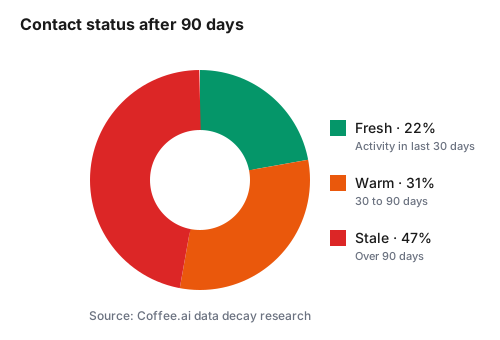
Flag stale contacts:
from datetime import datetime, timedelta
cutoff = datetime.now() - timedelta(days=90)
df['is_stale'] = df['last_activity'] < cutoff
Chapter 10: Exporting the Clean File
df.to_csv('crm_cleaned.csv', index=False)

quality_report = pd.DataFrame({
    'metric': ['Total rows', 'Duplicates removed', 'Invalid emails', 'Stale contacts'],
    'count': [len(df), duplicate_count, invalid_count, df['is_stale'].sum()]
})
quality_report.to_csv('data_quality_report.csv', index=False)
Two files come out. The cleaned CRM export ready to re-import. A quality report you send to whoever asked for the cleanup.
Chapter 11: What to Do With the Bad Records
Never delete duplicates or invalid records without saving them first. Keep an audit trail.
bad_records = df[~df['email_valid']]
bad_records.to_csv('records_needing_review.csv', index=False)
Send that file back to the CRM owner. Bad records almost always have a story. A trade show list that was uploaded raw. A form that broke last quarter. Someone learning your team's process.
Chapter 12: Setting Up Recurring Cleaning
A one-off cleanup lasts about 90 days before decay eats the gains back. Schedule this script on a cron job or GitHub Actions runner.
Best practice from data quality research: re-verify B2B contact data on a rolling 90-day cadence. That is the industry benchmark, and Pandas plus a scheduled job is the free version of what most enrichment tools charge for.
Commentary Section
Reach out to three data engineers or RevOps consultants for a favorite Pandas trick they use on messy CRM data. Candidates: LinkedIn RevOps influencers, HubSpot Certified Trainers, and open-source data cleaning tool maintainers.
Their tips add credibility and turn each contributor into a warm target when you promote the post.
Wrapping Up
Pandas replaces manual CRM cleanup in a few dozen lines. Ninety-day cadences prevent decay from ruining the effort.
Related tutorials worth reading next: the regex patterns for non-programmers guide for cleaning fields directly in Google Sheets, the beginner's guide to Apps Script triggers for scheduling automated jobs, and the guide to setting up your first data pipeline for building an ETL flow around this script.
Sources: