Why This Guide Exists
Gmail counts over 1.5 billion monthly active users. Google Sheets counts over 900 million. Yet most teams still copy information from emails into spreadsheets by hand.
The average knowledge worker loses 6+ hours a week to repetitive tasks that a script could handle. In one production workflow I built for a digital marketing agency, an inbox parser captured 3,930 media queries across six verticals with zero manual copy-paste after setup.
This guide shows the same approach so any Google account holder can run it.
Chapter 1: What You Will Build
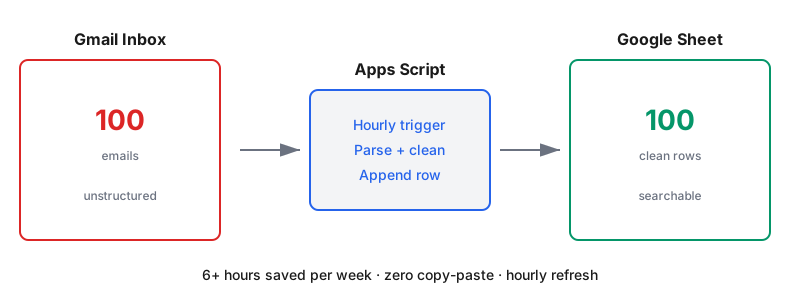
A Google Apps Script that runs on a timer. It reads a Gmail label. It pulls sender, date, subject, and body from each thread. It writes one row per email into a Sheet you control.
The output is a searchable database that keeps updating on its own.
Real Use Cases
Media queries from journalists that need triage.
Job applications from a careers inbox.
Contact form submissions when your form provider does not integrate with Sheets natively.
Newsletter signups from an outreach campaign.
RFPs and quote requests routed to a shared team inbox.
Each of these lives in Gmail today and would work better as a spreadsheet.
Chapter 2: The Cost of Manual Copy-Paste
Before the code, the numbers.
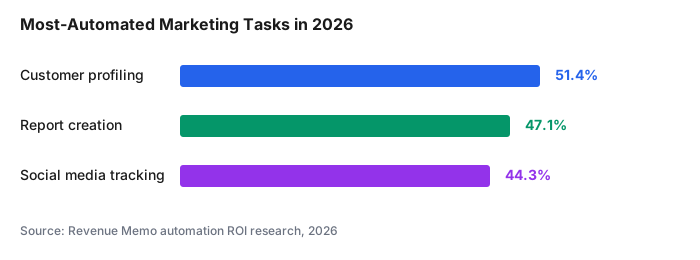
According to marketing automation research, 47% of marketers use automation specifically to improve efficiency in repetitive processes. Report creation ranks second among the most-automated tasks at 47.14% adoption. Only 40% of businesses have automated even 10% of their tasks. The remaining 60% are still moving data by hand.
That gap is the reason a script like this is worth building.
Chapter 3: The Prerequisites
You need three things.
A Gmail account. Any personal or Workspace address works.
A Google Sheet. Create a blank one, name it, and grab its ID from the URL. The ID is the long string between /d/ and /edit.
A Gmail label. Apply it to the emails you want captured. The script reads only that label, so nothing else in your inbox gets touched.
That is the entire setup.
Chapter 4: The Full Script
Open your Google Sheet. Click Extensions, then Apps Script. Paste this code and save.
function parseGmailToSheet() {
  const SHEET_ID = 'YOUR_SHEET_ID_HERE';
  const LABEL_NAME = 'to-capture';
  const SHEET_NAME = 'Inbox Data';

  const sheet = SpreadsheetApp.openById(SHEET_ID).getSheetByName(SHEET_NAME);

  if (sheet.getLastRow() === 0) {
    sheet.appendRow(['Date', 'From', 'Subject', 'Body Preview', 'Thread ID']);
  }

  const label = GmailApp.getUserLabelByName(LABEL_NAME);
  const threads = label.getThreads();

  threads.forEach(thread => {
    const messages = thread.getMessages();
    messages.forEach(msg => {
      const threadId = thread.getId();
      const existing = sheet.getRange('E:E').getValues().flat();

      if (!existing.includes(threadId)) {
        sheet.appendRow([
          msg.getDate(),
          msg.getFrom(),
          msg.getSubject(),
          msg.getPlainBody().substring(0, 500),
          threadId
        ]);
      }
    });
  });
}
Replace YOUR_SHEET_ID_HERE with your Sheet ID. Rename to-capture to whatever label you apply.
Save. Run once. Grant permissions when Google asks.
Chapter 5: Setting the Trigger
A script is useless if it never runs. Set it to run on a schedule.
In the Apps Script editor, click the clock icon on the left sidebar. That opens Triggers.
Click Add Trigger. Function to run: parseGmailToSheet. Event source: Time-driven. Select an hourly timer.
The script now checks Gmail every hour, captures anything new, and appends it to the Sheet.
Chapter 6: Regex for Cleaner Fields
Raw email bodies are messy. Signatures, disclaimers, and reply chains bloat every row.
Add this cleaning function above parseGmailToSheet:
function cleanBody(body) {
  body = body.replace(/On.*wrote:[\s\S]*/g, '');
  body = body.replace(/--[\s\S]*/g, '');
  body = body.replace(/\s+/g, ' ').trim();
  return body.substring(0, 300);
}
Then swap msg.getPlainBody().substring(0, 500) for cleanBody(msg.getPlainBody()).
Now each row shows the actual message, not a wall of signature text.
Chapter 7: Adding Custom Extraction
Sometimes the value is buried inside the email body. A price, a phone number, a name.
Regex handles that too.
function extractPhone(body) {
  const match = body.match(/(\+?\d{1,3}[-.\s]?)?\(?\d{3}\)?[-.\s]?\d{3}[-.\s]?\d{4}/);
  return match ? match[0] : '';
}

function extractEmail(body) {
  const match = body.match(/[\w.-]+@[\w.-]+\.\w+/);
  return match ? match[0] : '';
}
Pass the body through these before writing the row. Now the Sheet has a dedicated Phone and Email column pulled from every message.
Chapter 8: What Can Go Wrong (and How to Fix It)
"Authorization required" loop. Run the function once from the editor and approve every permission. The scheduled trigger only works after this handshake.
Duplicate rows. The script above checks column E for the thread ID before writing. If duplicates appear, check that column E was never cleared or reformatted.
Quota exceeded. Free Gmail accounts allow 20,000 threads read per day via Apps Script. Enterprise workflows above that limit need to batch by date range or upgrade to Workspace.
Nothing captured. Confirm the label name matches exactly, including case. Confirm at least one email actually carries that label.
Chapter 9: What This Unlocks
Once emails land in a Sheet, everything else opens up.
Sort by sender to see who reached out most. Filter by keyword to build a topical view. Pipe the Sheet into Looker Studio for a visual dashboard. Trigger a Slack notification when a specific sender comes through.
I use the same base script to populate a live PR pitch tracker, a client feedback log, and a lead intake for a solar startup.
Every one of those started as a five-line variation of the code above.
Commentary Section (Adds Credibility for Outreach)
Reach out to three practitioners for a two-sentence quote each on how they use Gmail-to-Sheets pipelines. Good candidates: a freelance ops consultant on Twitter or LinkedIn, a Google Workspace developer expert, and a marketing agency owner.
Sample outreach prompt: "Building a piece on Apps Script inbox parsers. Would you share a two-sentence take on where you have seen this save the most time in a real workflow?"
Publish their quotes with headshots and role attribution. This is what Brian Dean calls The Commentary Technique. It gives the post an outreach hook when you later ask those same people to share it.
Wrapping Up
Manual copy-paste is a productivity tax. Apps Script removes it in under 50 lines of code.
Related tutorials to read next: the QUERY function guide for filtering the captured data, the Looker Studio calculated fields guide for turning the Sheet into a dashboard, and the beginner's guide to Apps Script triggers for extending this pattern further.
Sources: